piegy.analysis
This module contains analytic tools for simulation results.
- analysis.check_convergence(mod, interval=20, start=0.8, fluc=0.05)
- Check whether simulation has reached convergence.Actually performs a “Cauchy check” since we do not know the limit. i.e., whether the fluctuation of population after some specified time is small enough.However, we know being Cauchy indicates convergent in real numbers. So this check works in terms of math.See implementation details at Clarifications-Convergence.
- Parameters:
mod (
piegy.simulation.modelobject) – where the parameters of the model and data are stored.interval (int) – takes average over some number of data points to smooth data.
start (float) – defines a time point by how much percentage of maxtime. Calculate fluctuation of U, V population after this point.
fluc (float) – threshold of fluctuation. Check whether max fluctuation of U, V population after
startproportion of time is less than this threshold.
- Returns:
whether fluctuation after
startproportion of time is less thanflucthreshold.- Return type:
bool
- analysis.combine_mod(mod1, mod2, force_combine=False)
- Combines the simulation results in two
piegy.simulation.modelobjects.Intended usage: if the fluctuation of one simulation is too large, you can run another simulation and then take average of the two.Raises error ifmod1andmod2have differentN,M,maxtime,record_itv,boundary,init_popu,matrices, orpatch_params(can’t combine two different models).Raises error ifmod1andmod2have the same seed: can’t reduce randomness if models used the same random seed.However, if you do wish to combine the two models any way and bypass the parameter checks above, setforce_combine = True.- Parameters:
mod1 – the first simulation.
mod2 – the second simulation.
force_combine (bool) – bypass all parameter checks and force combining the results of the two models.
- Returns:
a third model whose parameters are the same as
mod1andmod2, but data are the weighted average of the two (wieghted by the number of rounds each simulation ran)- Return type:
piegy.simulation.modelobject
Examples
Here are some usage examples of the piegy.analysis module.
We will use the following modules in the examples:
from piegy import simulation, figures, analysis
import numpy as np
Let’s then run our demo model and then see how to analyze the result using the analysis module. We increase sim_time to 10 to reduce stochasticity.
And for demostration purposes, the initial populatoin is also modified so that the simulation does not start from the equilibrium state.
mod = simulation.demo_model()
mod.sim_time = 5
simulation.run(mod)
check_convergence
A familiar way to check convergence is by plotting population dynamics and look at the curves. figures.UV_dyna(mod) gives the following figure:
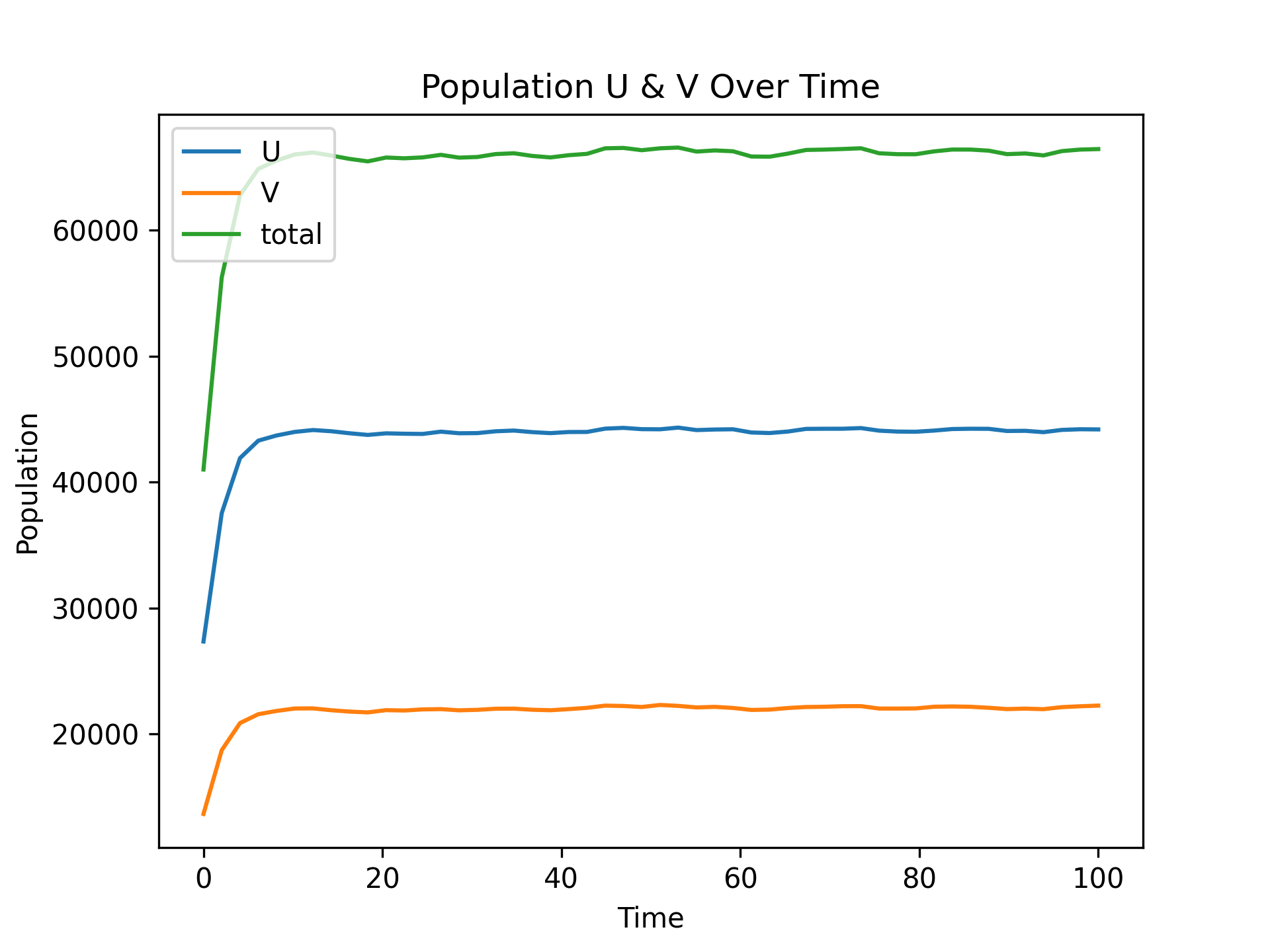
Population Dynamics with sim_time = 10
We can see it roughly converges, but some small fluctuations do exist due to stochasticity.
However, as we run more simulations and have lots of results, it is inconvenient to check convergence manually. Here we provide a automatic approach by piegy.analysis.check_convergence function:
print(analysis.check_convergence(mod, interval = 20, start = 0.8, fluc = 0.01))  # strict requirements
print(analysis.check_convergence(mod, interval = 20, start = 0.8, fluc = 0.05))  # relax a bit
The first line prints False and the second prints True. How to interpret?
Passing the second test means the simulation results do converge in some sense: there exists some relaxed condition under which the result is considered convergent.
Failing the rigorous test indicates existence of local fluctuations: the result is not smooth and stable enough.
And that’s the power of check_convergence function. It automatically checks whether the result converges, and converges to what extent.
In terms of actual usage, we recommend the following:
Say you have lots of simulation results and want to know which ones didn’t converge.
Set up a rigorous test and a relaxed test, and check each of the results with the two tests.
This should filter out many results that are already stable.
Then manually check the remaining uncertain ones by plotting population dynamics.
But what about the results that didn’t converge? We provide an approach to possibly re-use these results rather than simply discarding them.
combine_mod
First let us make a copy of mod without data, just the parameters. You can see copy method at piegy.simulation.model.
mod2 = mod.copy(copy_data = False)
Then change the seed of sim2, set to either None or a different seed, and run the simulation on mod2:
mod2.set_seed(42)  # a different seed or None
simulation.run(mod2)
Now we have two simulation results, one in mod and the other one in mod2. Both of them have sim_time = 10, i.e., the simulation was repeated 10 times.
But since they have different seeds (or None), we can take average of two simulations and obtain a new result, as if it was ran 20 times:
mod3 = analysis.combine_mod(mod, mod2)
mod3 has a much more stable result:
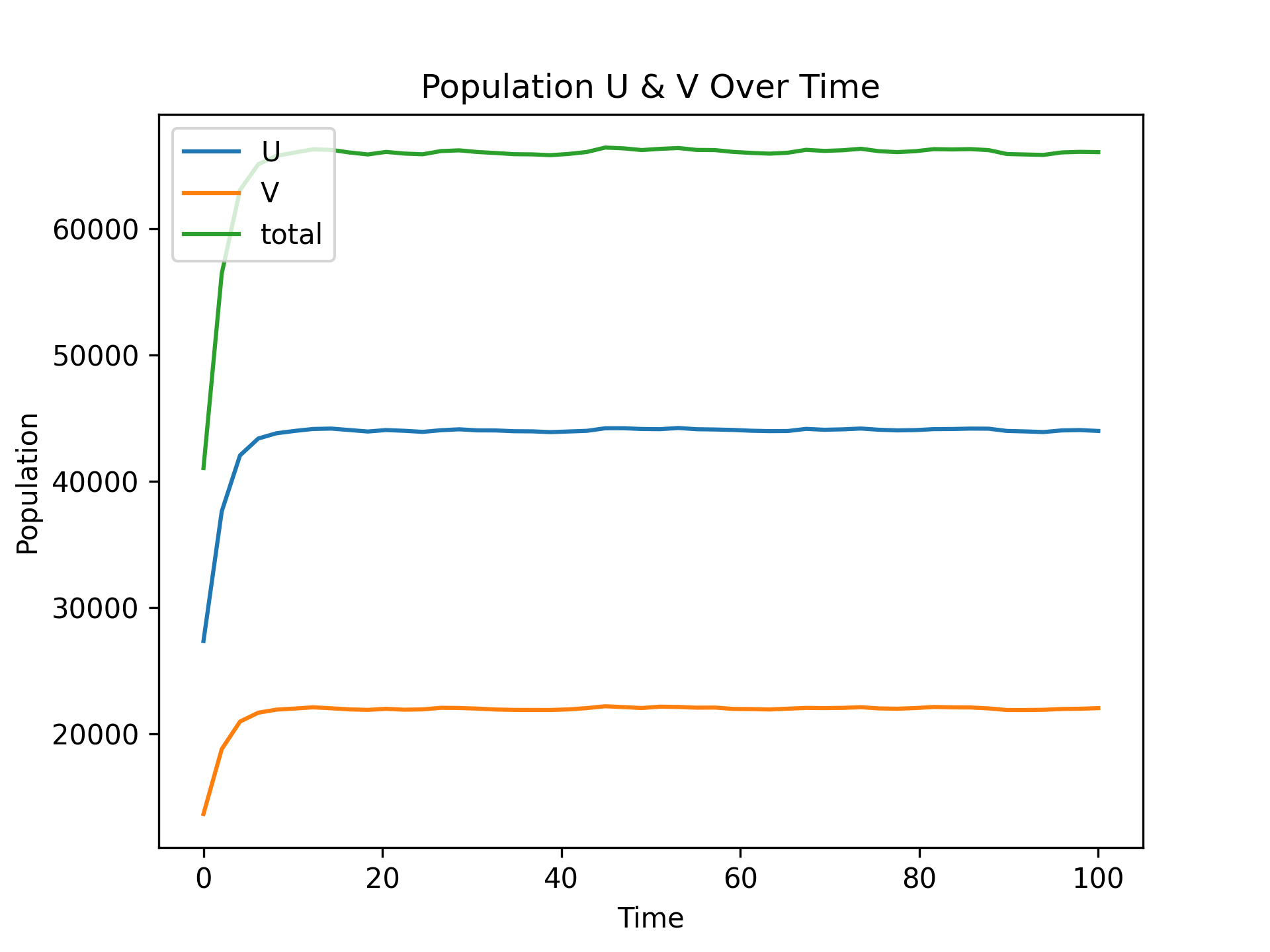
Population Dynamics of mod, mod2 Combined
However, if you try the above convergence tests again, you would note mod3 still fails the strict one. A larger number of repetitions such as sim_time = 20 may pass the test.