piegy.test_var
This module contains tools to test the influence of one or two patch variables on the simulation results.
Test Functions
- test_var.test_var1(mod, var, values, dirs, compress_ratio=1, scale_maxtime=False)
- Test the influence of one patch variable on simulation results.
test_var1makes copies ofmodand changes the patch variablevarto the specified values (in all patches), perform simulations, and then save data. The originalmodis not changed.- Parameters:
mod (
piegy.simulation.modelobject) – where the parameters of the model and data are stored.var (str) – which variable to test. Expect a string of the variable name, such as
'mu1','kappa1'.values (list or
numpy.ndarray) – what values ofvarto test.dirs (str) – where to save test data. Expect a path to a folder.
test_var1then create subfolders insidedirsand store data.compress_ratio (int) – used to reduce data size: takes average over every
'compress_ratio'many data points when saving. Passed topiegy.simulation.model.compress_datamethod.scale_maxtime (bool) – whether to scale
maxtimeof tests towards the inputmod. Intended to avoid unnecessarily long runtime possibly encountered in tests due to different values.
- Returns:
a list of directories where all test results are stored. One directory corresponds to one value of
var.- Return type:
list of str
- test_var.test_var2(mod, var1, var2, values1, values2, dirs, compress_ratio=1, scale_maxtime=False)
- Test the influence of two patch variables on simulation results.Note which variable comes first does make a difference when plotting: var2 will be placed on x-axis, while different values of var1 are represented by different curves.
test_var2makes copies ofmodand changes the patch variablesvar1andvar2to the specified values (in all patches), perform simulations, and then save data. The originalmodis not changed.- Parameters:
mod (
piegy.simulation.modelobject) – where the parameters of the model and data are stored.var1 (str) – the first variable to test. Expect a string of the variable name, such as
'mu1','kappa1'.var2 (str) – the second variable to test.
values1 (list or
numpy.ndarray) – what values ofvar1to test.values2 (list or
numpy.ndarray) – what values ofvar2to test.dirs (str) – where to save test data. Expect path to a folder.
test_var2then create subfolders insidedirsand store data.compress_ratio (int) – used to reduce data size: takes average over every
'compress_ratio'many data points when saving. Passed topiegy.simulation.model.compress_datamethod.scale_maxtime (bool) – whether to scale
maxtimeof tests towards the inputmod. Intended to avoid unnecessarily long runtime possibly encountered in tests due to different values.
- Returns:
a 2D list of directories where all test results are stored. One directory corresponds to one pair of
var1value andvar2value.- Return type:
2D list of str
Plot Functions
The following functions help to visualize simulation results.
- test_var.var_HV1(var, values, var_dirs, ax_H=None, ax_D=None, start=0.95, end=1.0, color_H='purple', color_D='green')
- Plots how U, V average population over a specified time interval change with different values of a patch variable.
- Parameters:
var (str) – which patch variable you tested. Expect a string of the variable name, such as
'mu1','kappa1'.values (list or
numpy.ndarray) – what values you tested with.var_dirs (list of str) – where test results are stored. Expect the return value of
piegy.test_var.test_var1. You can get a copy of it bypiegy.test_var.get_dirs1if lost. Data not existing are ignored.ax_H (matplotlib axes) – matplotlib axes to plot the change of U population over
values. A new axes will be created ifNoneis given.ax_H – matplotlib axes to plot the change of V population over
values. A new axes will be created ifNoneis given.start (float) – lower bound of the time interval to plot.
end (float) – upper bound of the time interval to plot. For details of
startandend, see Clarifications-start_end.
- Returns:
two figures of how U, V population change with values of
var- Return type:
matplotlibfigures.
- test_var.var_HV2(var1, var2, values1, values2, var_dirs, ax_H=None, ax_D=None, start=0.95, end=1.0, color_H='viridis', color_D='viridis', alpha=1)
- Plot how U, V average population over a specified time interval change with different values of two patch variables.
var2values are shown on the x-axis;var1values are shown by different curves.- Parameters:
var1 (str) – the first patch variable you tested. Expect a string of the variable name, such as
'mu1','kappa1'.var2 (str) – the second patch variable you tested.
values1 (list or
numpy.ndarray) – what values forvar1you tested.values2 (list or
numpy.ndarray) – what values forvar2you tested.var_dirs (double list of str) – where test results are stored. Expect the return value of
piegy.test_var.test_var2. You can get a copy of it bypiegy.test_var.get_dirs2if lost. Data not existing are ignored.ax_H (matplotlib axes) – matplotlib axes to plot the change of U population over
values1andvalues2. A new axes will be created ifNoneis given.ax_H – matplotlib axes to plot the change of V population over
values1andvalues2. A new axes will be created ifNoneis given.start (float) – lower bound of the time interval to plot.
end (float) – upper bound of the time interval to plot. For details of
startandend, see Clarifications-start_end.color (str) – used to set gradient colors for the curves in plots. Expect name of a matplotlib color map.
alpha (float) – alpha value of the color RGB params. Used to make points semi-transarent if overlapping.
- Returns:
two figures of how U, V payoff change with values of
var1andvar2- Return type:
matplotlibfigures.
- test_var.var_pi1(var, values, var_dirs, ax_H=None, ax_D=None, start=0.95, end=1.0, color_H='violet', color_D='yellowgreen')
- Plots how U, V average payoff over a specified time interval change with different values of a patch variable.
- Parameters:
var (str) – which patch variable you tested. Expect a string of the variable name, such as
'mu1','kappa1'.values (list or
numpy.ndarray) – what values you tested with.var_dirs (list of str) – where test results are stored. Expect the return value of
piegy.test_var.test_var1. You can get a copy of it bypiegy.test_var.get_dirs1if lost. Data not existing are ignored.ax_H (matplotlib axes) – matplotlib axes to plot the change of U payoff over
values. A new axes will be created ifNoneis given.ax_H – matplotlib axes to plot the change of V payoff over
values. A new axes will be created ifNoneis given.start (float) – lower bound of the time interval to plot.
end (float) – upper bound of the time interval to plot. For details of
startandend, see Clarifications-start_end.
- Returns:
two figures of how U, V payoff change with values of
var- Return type:
matplotlibfigures.
- test_var.var_pi2(var1, var2, values1, values2, var_dirs, ax_H=None, ax_D=None, start=0.95, end=1.0, color_H='viridis', color_D='viridis', alpha=1)
- Plot how U, V average payoff over a specified time interval change with different values of two patch variables.
var2values are shown on the x-axis;var1values are shown by different curves.- Parameters:
var1 (str) – the first patch variable you tested. Expect a string of the variable name, such as
'mu1','kappa1'.var2 (str) – the second patch variable you tested.
values1 (list or
numpy.ndarray) – what values forvar1you tested.values2 (list or
numpy.ndarray) – what values forvar2you tested.var_dirs (double list of str) – where test results are stored. Expect the return value of
piegy.test_var.test_var2. You can get a copy of it bypiegy.test_var.get_dirs2if lost. Data not existing are ignored.ax_H (matplotlib axes) – matplotlib axes to plot the change of U payoff over
values1andvalues2. A new axes will be created ifNoneis given.ax_H – matplotlib axes to plot the change of V payoff over
values1andvalues2. A new axes will be created ifNoneis given.start (float) – lower bound of the time interval to plot.
end (float) – upper bound of the time interval to plot. For details of
startandend, see Clarifications-start_end.color (str) – used to set gradient colors for the curves in plots. Expect name of a matplotlib color map.
alpha (float) – alpha value of the color RGB params. Used to make points semi-transarent if overlapping.
- Returns:
two figures of how U, V payoff change with values of
var1andvar2- Return type:
matplotlibfigures.
Other Functions
Other useful functions.
- test_var.var_convergence1(var_dirs, interval=20, start=0.75, fluc=0.05)
- Check whether the test results converge, used when just one variable is tested. This function calls
check_convergencefunction inpiegy.simulation_analysis.Please usepiegy.test_var.var_convergence2to check convergence when testing two vairables.- Parameters:
var_dirs (double list of str) – where all test results are stored. Expect the return value of
piegy.test_var.test_var1. You can get a copy of it bypiegy.test_var.get_dirs1if lost. Data not existing are ignored.interval (int) – takes average over some number of data points to smooth data.
start (float) – defines a time point. Calculate fluctuation of U, V population after this point.
fluc (float) – threshold of fluctuation. Check whether max fluctuation of U, V population after
startproportion of time is less than this threshold.
- Returns:
a list of directories where the data didn’t converge.
- Return type:
list of str
- test_var.var_convergence2(var_dirs, interval=20, start=0.75, fluc=0.05)
- Check whether the test results converge, used when just one variable is tested. This function calls
check_convergencefunction inpiegy.simulation_analysis.Please usepiegy.test_var.var_convergence2to check convergence when testing two vairables.- Parameters:
var_dirs (double list of str) – where all test results are stored. Expect the return value of
piegy.test_var.test_var2. You can get a copy of it bypiegy.test_var.get_dirs2if lost. Data not existing are ignored.interval (int) – takes average over some number of data points to smooth data.
start (float) – defines a time point. Calculate fluctuation of U, V population after this point.
fluc (float) – threshold of fluctuation. Check whether max fluctuation of U, V population after
startproportion of time is less than this threshold.
- Returns:
a list of directories where the data didn’t converge.
- Return type:
list of str
- test_var.get_dirs1(var, values, dirs)
- Mimics the format of how
piegy.test_var.test_var1creates directories and return a copy of its return value.Used to retrieve the directories of data.- Parameters:
var – the patch variable you tested.
values1 (list or
numpy.ndarray) – what values forvaryou tested.dirs (str) – the path of directory which you passed to
test_var1(or a new path if you re-named or moved it).
- Returns:
a list of where
piegy.test_var.test_var1saved data.- Return type:
list of str
- test_var.get_dirs2(var1, var2, values1, values2, dirs)
- Mimics the format of how
piegy.test_var.test_var2creates directories and return a copy of its return value.Used to retrieve the directories of data.- Parameters:
var1 (str) – the first patch variable you tested.
var2 (str) – the second patch variable you tested.
values1 (list or
numpy.ndarray) – what values forvar1you tested.values2 (list or
numpy.ndarray) – what values forvar2you tested.dirs (str) – the path of directory which you passed to
test_var2(or a new path if you re-named or moved it).
- Returns:
a double list of where
piegy.test_var.test_var2saved data.- Return type:
double list of str
Examples
The piegy.test_var module provided several handy tools to test how patch vairables influence simulation results, either population or payoff.
First please import necessary modules:
from piegy import simulation, test_var
We will use our classical demo model. You can obtain a copy by piegy.simulation.demo_model:
mod = simulation.demo_model()
If we run this demo model directly, The equilibrium U, V population is around 5.7 and 2.7 per patch. (For model parameters and simulation results, see Typical Params)
You might be wondering, would change of patch variables influence equilibrium population? If we keep all other parameters the same and change the value of just one patch variable, will the equilibrium population and payoff be different?
Great question! This is exactly what this module is made for: test infleunce of one or two patch variables on simulation results. Let’s see how to use it.
Say you want to test the mu1 variable on a few values [0.1, 0.3, 0.5, 0.7, 0.9]:
var = 'mu1'
values = [0.1, 0.3, 0.5, 0.7, 0.9]
Then you can call piegy.test_var.test_var1 to test how the above values for w1 influence population and payoff. dirs is the directory where data will be saved.
The directory will be created if not existing.
dirs = 'test_var_dirs'
var_dirs = test_var.test_var1(mod, var, values, dirs)
The return value var_dirs is a list of directories where data are stored. It is structured in a fixed format and tells other functions where to find data.
If you print var_dirs, it looks like:
print(var_dirs)
outputs:
['test_var_dirs/mu1=0.1', 'test_var_dirs/mu1=0.3', 'test_var_dirs/mu1=0.5',
 'test_var_dirs/mu1=0.7', 'test_var_dirs/mu1=0.9']
There are many ways to analyze data, you can either use the figure functions in piegy.figures, implement your own methods, …
But piegy.test_var module does provide several handy tools. For example, let’s try test_var.var_HV1:
fig_UV, ax_UV = plt.subplots(2, 1, figsize = (6.4, 9.6))
test_var.var_HV1(var, values, var_dirs, ax_UV[0], ax_UV[1])
This function plots how U, V equilibrium population change with values of mu1:
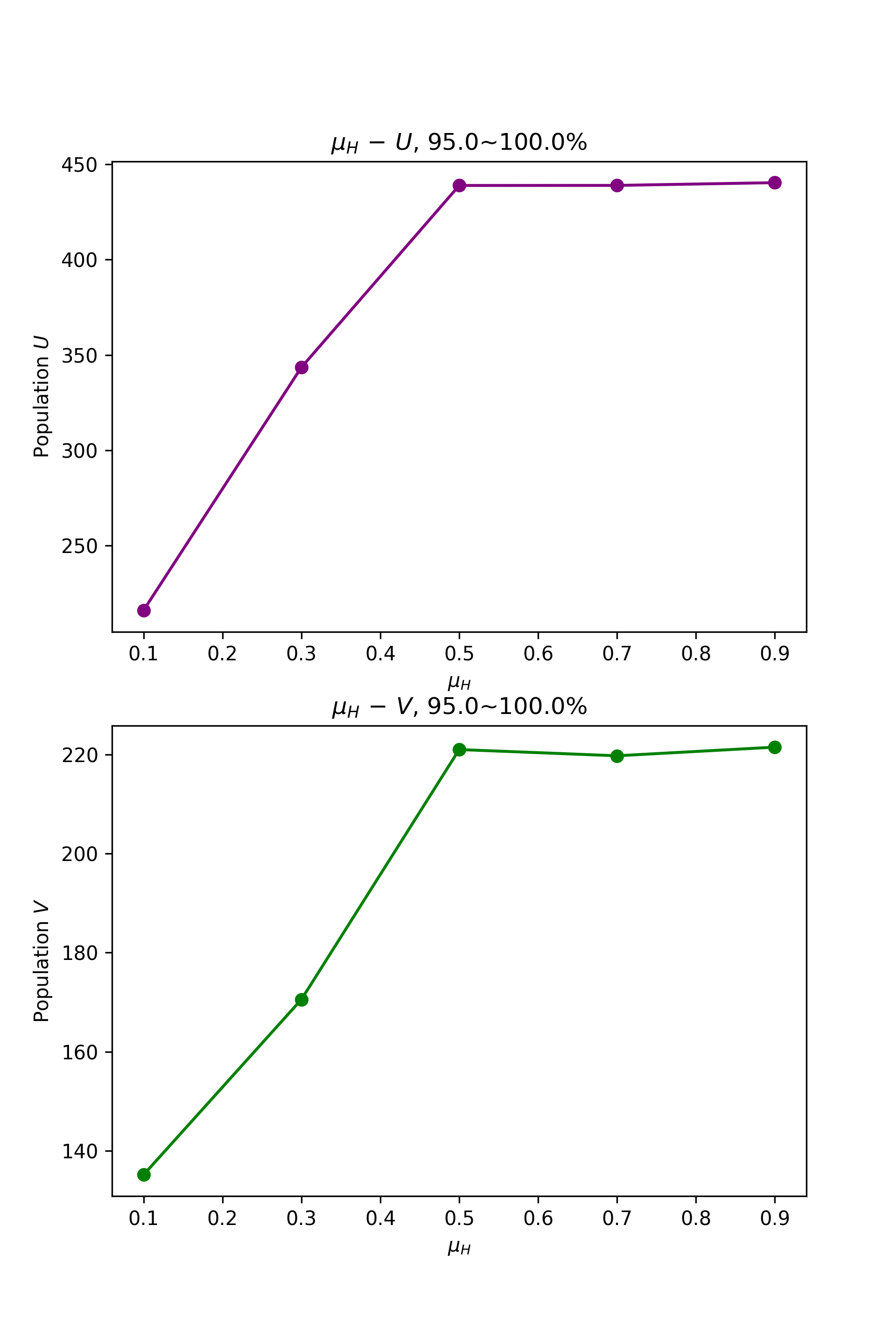
Change of U and V Population with mu1
You can also plot change of payoff by test_var.var_pi1:
fig_pi, ax_pi = plt.subplots(2, 1, figsize = (6.4, 9.6))
test_var.var_pi1(var, values, var_dirs, ax_pi[0], ax_pi[1])
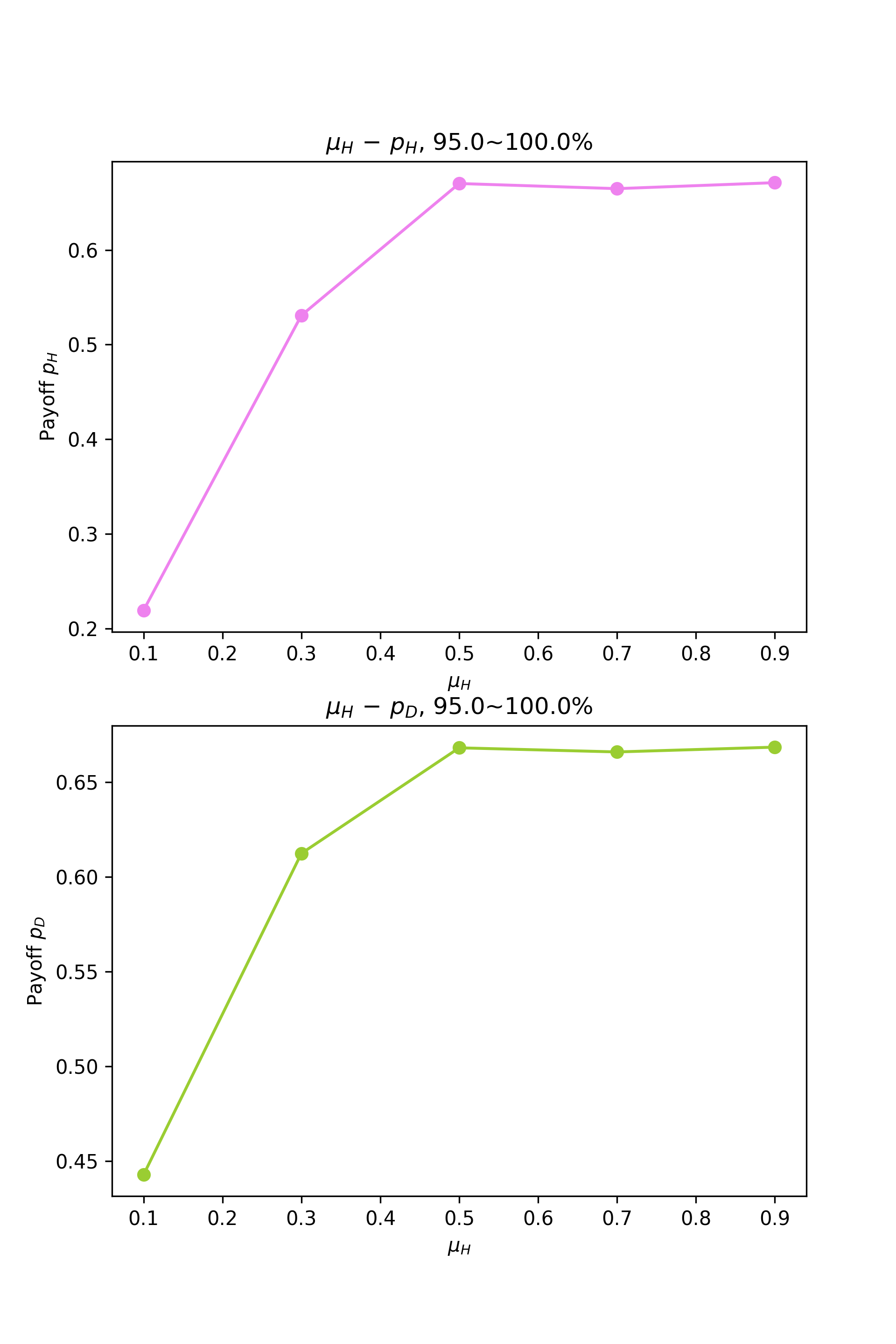
Change of U and V Payoff with mu1
We observe a roughly decreasing trend here: larger mu1 value tends to decrease population and payoff.
It’s also noteworthy that our demo model mod runs the simulation only once: mod.sim_time = 1.
So the figures above are probably far from accurate. If we set mod.sim_time to 20 and try more values of mu1, we could see a clearer trend.
Note all the plot functions above requires var_dirs (return value of test_var.var_HV1): it tells the functions where to find data.
If you want to read from an old set of test_var1 data but don’t have the old var_dirs anymore, you can remake it by test_var.get_dirs1 function.
test_var.get_dirs1 automatically makes var_dirs based on what variable, values and the “base directory” dirs you used.
You can also pass in more a larger list of values if you ran more tests afterwards.
var_dirs_remade = test_var.get_dirs1(var, values, dirs)
var_dirs_remade will be the same as the original var_dirs. You can pass it to the plot functions above.
So far we have introduced most of the test_var functions for the 1-variable tests. You can also perform 2-variable tests with the counterparts of these functions; the usage is very similar.